Session persistence
Close the client, suspend the laptop, lose the network — agents keep running. Reopen and you're back in the same pane with scrollback intact. A four-hour migration no longer depends on one SSH connection staying up.
Operate Claude Code, Codex, Gemini CLI, Grok CLI, Aider, and more — on build servers, GPU boxes, staging hosts, and this computer. Every agent runs inside a tmux session on its host: close the client, suspend the laptop, lose the network — work continues. Now from a tablet or a phone, too.
AgentMux never owns the agent process — it attaches to a tmux session on the host. Persistence is guaranteed by construction, not by the client staying online.
Close the client, suspend the laptop, lose the network — agents keep running. Reopen and you're back in the same pane with scrollback intact. A four-hour migration no longer depends on one SSH connection staying up.
Every agent's pane is a full terminal — colour, mouse reporting, selection, search — not a transcript view. Step in mid-task, correct the agent, and hand control back without restarting the run.
Split the terminal area into up to nine panes — a 3×3 wall across hosts, each independently interactive. Drag the seams, double-click a tab to zoom, and the layout reflows with the window and is restored on next start.
Send one instruction to any selection of agents; each returns a receipt confirming delivery. Fan-out to a fleet is auditable rather than assumed.
A local model served by Ollama can take an objective — say, working out why an agent stalled — one tool call at a time. Every mutating operation is held for your explicit approval; scheduled patrols are strictly read-only.
Project facts, preferences, and agent activity are indexed for retrieval by wording or by meaning. Embeddings are computed locally; nothing leaves the machine. Credentials matching known patterns are redacted before storage.
The same binary runs headless, so a tablet browser is a complete AgentMux — terminals, agents, the toolkit, file browsing, all of it. Android goes further with a standalone app that carries the whole core: SSH runs from the device, and no always-on machine is needed.
An agent asking a question, one that finished with results to review and one idle at its prompt all read as “running” before. The poll now reads each pane and classifies it, marks the transitions a person needs to see, and takes the mark down when somebody actually looks.
It checks for new releases shortly after launch and every six hours: download, verify the published sha256, swap in place, relaunch — and roll back if the swap fails. The whole configuration also travels to another computer as one encrypted file, and an import never overwrites what is already there.
Everything below is an actual application screenshot — no concept renders.

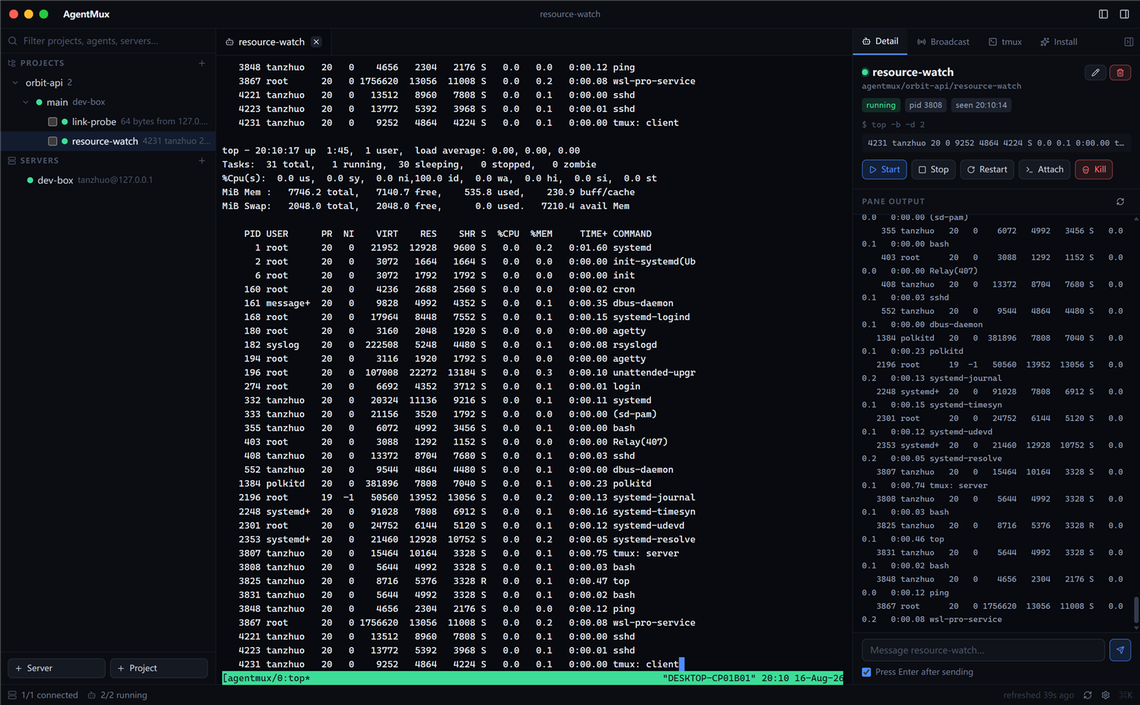
Attach to any agent's tmux pane: full colour, mouse reporting, search and selection. The side panel shows process state, recent output, and lifecycle controls.
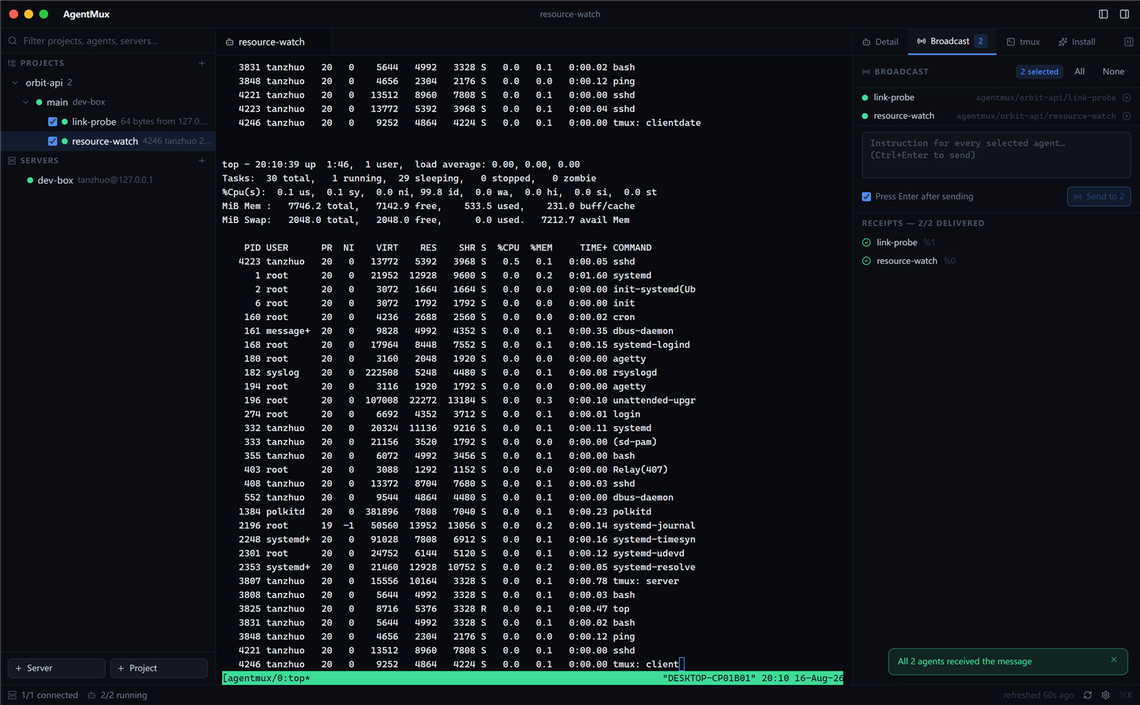
Send the same instruction to any selection of agents, across projects and hosts. Each agent returns a delivery receipt, turning fan-out from "assumed" into "confirmed, one by one."
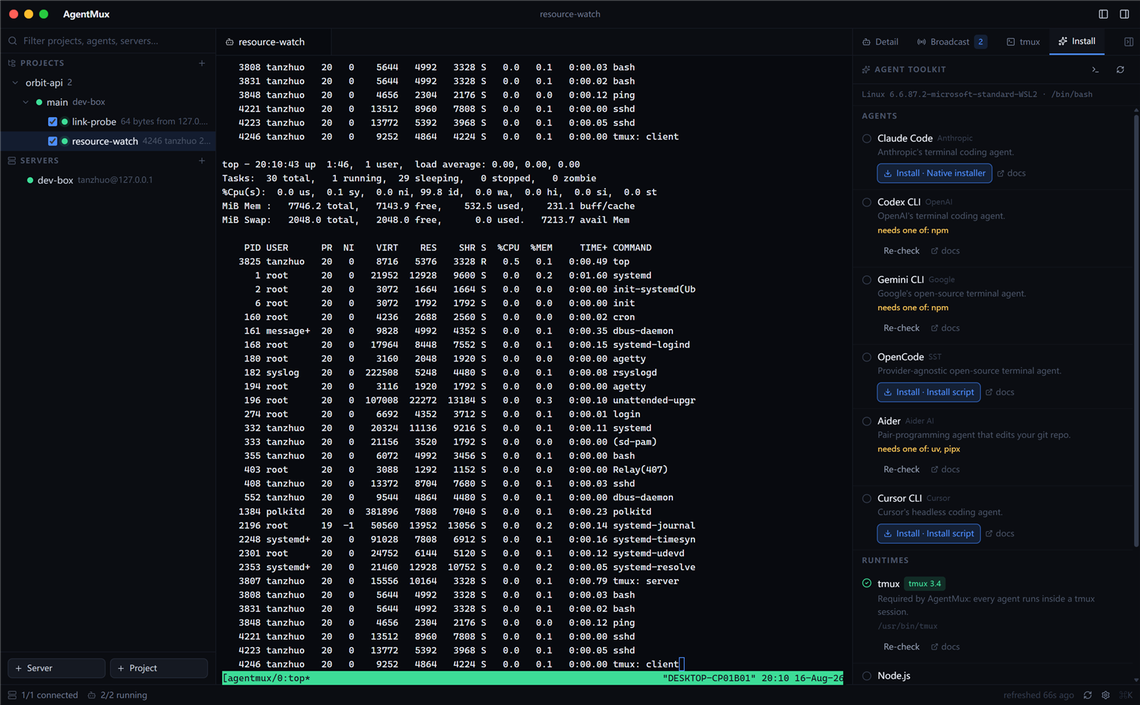
The install panel inspects a host first and offers only the agent CLIs and runtimes it can actually support, stating why others are unavailable. Installation runs inside tmux, so a dropped connection can't leave a partial package tree.
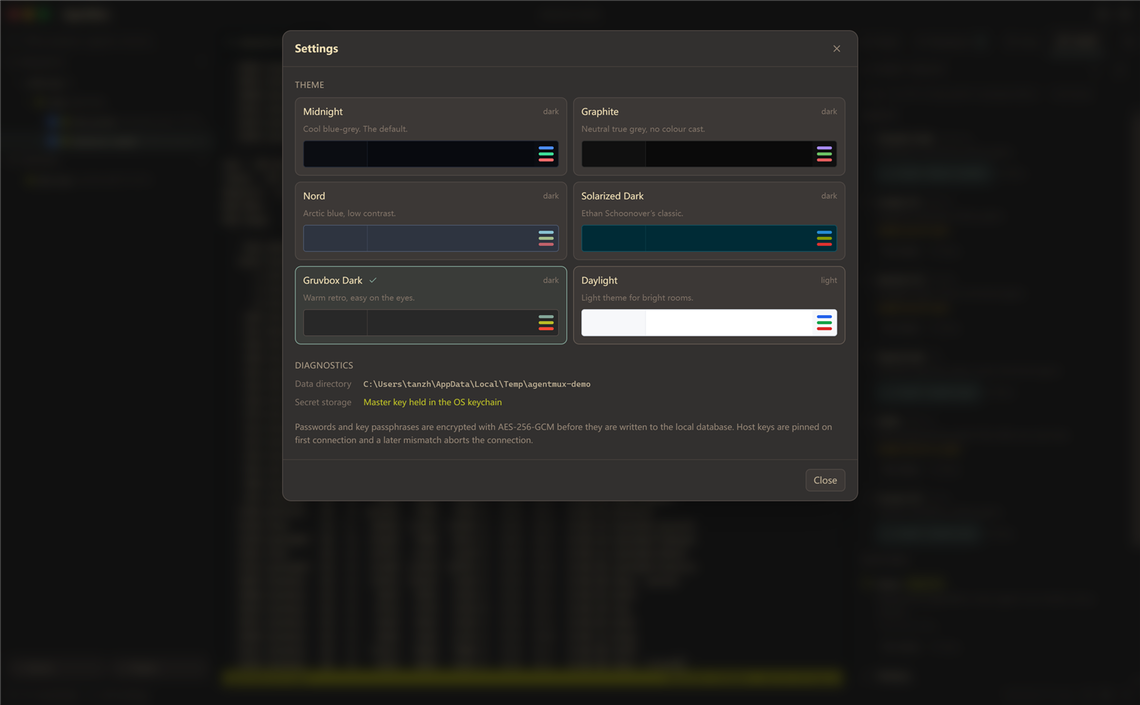
Apple's system palette by default, with six alternative themes including Nord, Solarized, and a light theme. Information density tuned for long supervision sessions.
Two paths beyond the desktop: headless serve mode turns any browser into a complete client, and Android has a standalone app carrying its own core. Both run the same frontend on the same core — neither is a cut-down view.
Releases ship a dedicated server build, agentmux-server-linux-{amd64,arm64} — fully static, with no GTK, no webview and no display needed. Copy it to any Linux server and run it. The desktop build enters the same mode with --serve. The first start generates an access token and prints it in the log (kept as serve-token in the data directory; AGENTMUX_TOKEN overrides it).
Point the tablet at http://host:8642, enter the token once, and everything works — terminals, agents, the toolkit, file browsing. “Add to Home Screen” (Safari on iPad, Chrome on Android) installs it as a standalone app. Closing the browser stops nothing, exactly like closing the desktop window: the agents live in remote tmux.
Every release attaches agentmux-android.apk (Android 8.0+ · arm64) with the same core the server build ships, embedded and started by a foreground service — foreground because Android freezes background processes at screen lock, and the core holds the SSH connections. The layout was reworked for small screens too: under 768px the side panels become overlay drawers, and a bottom navigation bar puts the tree, the command palette, the detail panel and settings where a thumb actually reaches, safe-area inset respected.
Beyond tablets and phones, the August round landed the following.
A terminal that lost its transport is not over — the tmux session on the far side is still running. The pipe is rebuilt with the same shell id, the same scrollback and the same pane, backing off from one second to fifteen and leaving the manual button after about five minutes. Two keepalives, TCP and SSH, answer different questions; one-shot command terminals are exempt, because re-running an install is a side effect nobody asked for.
Some work is a screen. Right-click a host and 3389 or 5900 is dialled through the SSH connection that host already has, forwarded to a port here and handed to whichever viewer this computer has — Remote Desktop Connection, Screen Sharing, Remmina. A desktop listening on its own loopback needs nothing opened to the network.
The app checks the release feed shortly after launch and every six hours after. A newer version raises a one-line banner under the title bar: upgrade and restart, release notes, or later. Upgrading downloads with a progress bar, verifies the published sha256, swaps the running executable, and rolls back to the build that was running if the swap fails.
Hosts, folders, projects, workspaces and agent definitions go into a single passphrase-encrypted file (Argon2id + AES-256-GCM) and open on the other side. An import never overwrites: a host at the same address, a project with the same name, a path on the same machine — each is left exactly as it is, so importing twice adds nothing.
The metrics panel now reports CPU model, DIMM specs, physical drives and graphics adapters alongside utilisation. Those are static, so they ride a one-shot read cached for the session rather than the three-second ticker.
One-click install now covers Grok CLI, Docker (six methods, retrying against a mirror where the network needs one, then starting the daemon and adding the user to the group) and Ollama. The interface adds Traditional Chinese — a full catalogue in Taiwan terminology, not a character-for-character conversion.
These aren't settings. They're design decisions, and most of them cannot be switched off.
Passwords and key passphrases are encrypted with AES-256-GCM before storage; the key lives in the OS keychain (Keychain, Credential Manager, Secret Service). If the keychain is unavailable, a 0600-file fallback is reported in the status bar.
Host keys are pinned on first connection. Any subsequent mismatch aborts the connection with an explanation — a man-in-the-middle swap cannot pass silently.
No secret crosses into the UI process. The interface learns only whether a secret is set — never its value.
The orchestrator can only call a fixed whitelist of tools, each carrying a risk tier fixed at declaration. Execution passes through a single gate combining tier, host trust level, and the run's trigger.
Scheduled patrols are refused every non-read tool unconditionally — and that restriction is not configurable. A patrol can report a stalled agent, but has no authority to act on it.
Every step of every run is recorded — including proposals that were refused, rejected, or left unanswered. Remote output enters the model marked as data; instruction-shaped text raises a flag on the approval card.
Migrations, refactors, and test campaigns that outlast a working session or a network link.
Three to fifty hosts with concurrent agent activity, presented as one tree with per-agent status.
Instruct an entire fleet in one action, with confirmation of what was delivered.
Bring a new host to a working state without assembling install commands by hand.
Scheduled read-only patrols that report stalled agents — without authority to act on them.
Planning, embeddings, and memory run locally. No proxying of agent model traffic, no reading of API keys.
Unix-like remote hosts need only tmux and an SSH account — AgentMux can install tmux where it's missing; a remote Windows host just needs OpenSSH Server. This computer is even simpler: no credentials at all.
Read the full docs→Remote: address, user, and one of ssh-agent / key / password, with jump hosts supported. Local: nothing but a name.
A working directory on that host. Or browse the host's files and add the directory in place — its name, path, and host are already known.
A name and the command that starts it. Hit Start and it's running inside tmux on the host.
claude --dangerously-skip-permissionsAttaching to an agent, opening a shell, installing a CLI, changing theme — the fastest route to all of it.
Ctrl / ⌘ + KAll produced by GitHub Actions from a tagged commit, each file with a .sha256 alongside.
Any Linux · amd64 and arm64 · no GTK, no webview, no display
agentmux-server-linux-amd64.tar.gz
agentmux-server-linux-arm64.tar.gz
Android 8.0+ · arm64 · embeds the full core, runs standalone
agentmux-android.apk
Download ↓xattr -dr com.apple.quarantine);
on Windows, "More info → Run anyway". Downloading with
curl -L -O avoids the macOS quarantine attribute.
No. Objectives, prompts, and repository conventions remain yours. The orchestrator investigates and proposes; any action that modifies a host executes only after your explicit approval.
Remote Unix-like hosts (Linux / macOS) need a POSIX shell, tmux, and SSH (AgentMux can install tmux where it's missing); a remote Windows host just needs OpenSSH Server enabled — sessions are hosted by AgentMux's own session daemon, deployed over SFTP on first use. This computer qualifies directly on Linux and macOS; on Windows the same machine offers two local hosts — the WSL distribution (where tmux lives) and native Windows (PowerShell, persisted by the same daemon, so closing the window does not stop native work either).
No. Only local orchestration and semantic memory search need Ollama (one chat model plus one embedding model). Without it, everything else is fully functional.
No — deliberately. Agent traffic goes straight from the host to whichever provider the agent CLI is configured for. AgentMux does not proxy it and does not read the keys, so it can neither report cost nor enforce a budget.
One operator per installation. State, credentials, and the decision log live on the workstation — no shared server, no team account, no central audit sink. Two people working the same fleet see the same tmux sessions but keep separate histories.
Never. Removing a workspace or agent record only removes the local record — the tmux session keeps running. The one control that destroys a running session is named Kill, and it confirms first, stating what is lost.
Two ways. Run the headless server on any Linux machine — the dedicated agentmux-server-linux-{amd64,arm64} build, or the desktop build with --serve — then open http://host:8642 on the tablet, enter the token once and “Add to Home Screen” for a standalone app. That is the iPad route. On Android you can instead install agentmux-android.apk, which embeds the full core and needs no server at all.
In serve mode the core runs on one of your machines and the tablet is a client, so phone, tablet and desktop see the same state. The APK puts the core on the device itself: SSH runs from the phone, configuration and keys stay local, and no always-on machine is involved. The foreground service is deliberate — without it Android freezes the process at screen lock and cuts every SSH connection.
It authenticates with an access token alone, generated on first start and kept as serve-token in the data directory. That is enough on a LAN or over a VPN; for public access, put an HTTPS reverse proxy in front rather than exposing plain HTTP.
One binary, one SQLite file, zero servers. Download and go — MIT licensed.